
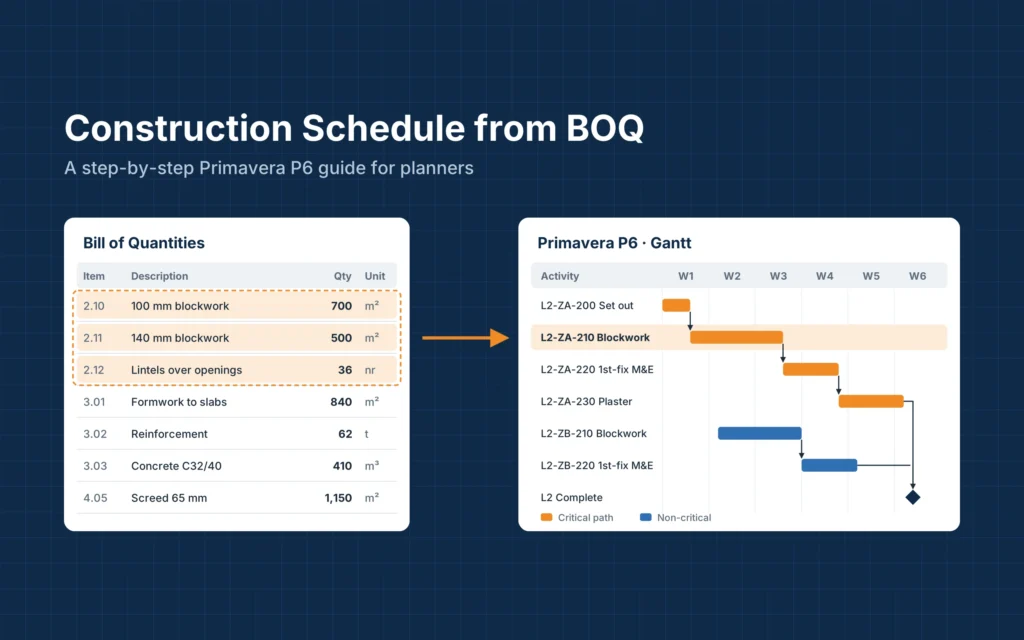
If you’ve ever been handed a tender pack and asked for a baseline programme by the end of the month, you know the BOQ is both your best starting point and your biggest data-entry job. This guide is for planners and project controls teams who need to build a construction schedule from a BOQ that is logic-linked, traceable to the bill of quantities, and ready to baseline in Primavera P6.
Why the First Baseline Takes So Long
Every construction schedule starts with a planner, a stack of tender documents and a blank Primavera P6 or MS Project file. The bill of quantities says what will be built. The drawings say where. The contract says by when and on what terms. None of them says in what order, or how long each piece will take.
Turning those documents into a sequenced, resource-aware programme is the planner’s job, and on a complex project it can take weeks.
In short, to build a construction schedule from a BOQ:
- Build the WBS from BOQ sections and drawing locations.
- Group BOQ items into crew-and-location activities.
- Calculate durations from quantities and production rates.
- Add logic from the drawings.
- Apply contract milestones and calendars.
- Load resources and costs.
- Validate before baselining.
What Kind of Schedule Does This Guide Build?
This guide builds a critical path method (CPM) schedule at roughly Level 3 detail, typically used for a contractor’s baseline programme. Every activity is tied to the work before and after it, allowing the schedule to calculate float and show what drives completion.
In P6 or MS Project, you’ll see the result as a Gantt chart, but the bars come from the logic, not the other way round. The method works in any CPM tool, whether your team calls it a schedule or a construction programme.
It isn’t a line-by-line BOQ import. BOQ lines are written for pricing, not sequencing: the BOQ provides the structure and quantities, while the planner decides how to group, sequence and resource the work.
What Each Document Contributes to the Schedule
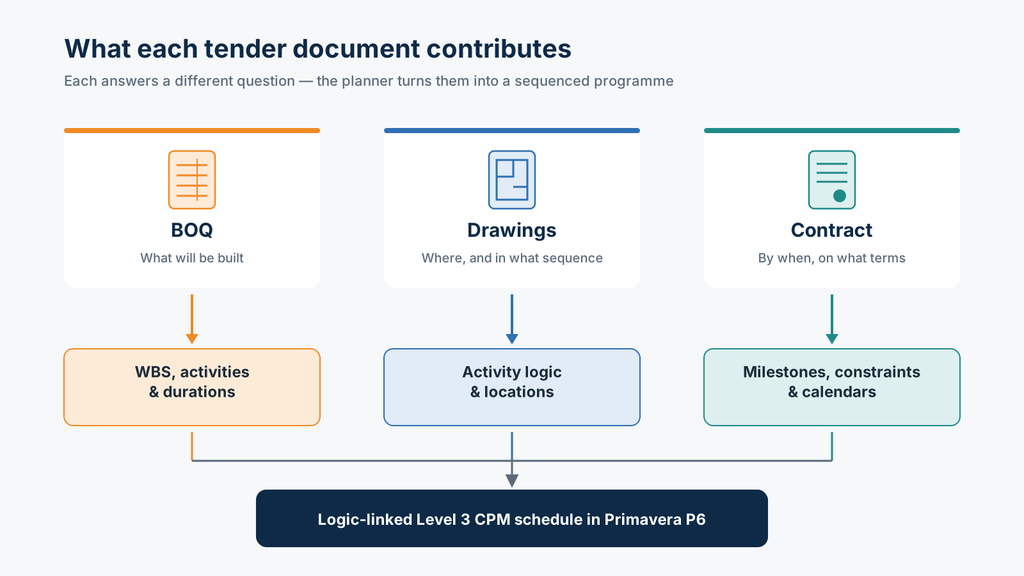
Each tender document answers a different question:
- BOQ: work items and quantities → WBS, activities and durations
- Drawings: locations and sequence → activity logic
- Contract: dates, milestones and working hours → constraints and calendars
The BOQ is the best starting point because it is already structured and measured, but on its own it is a list, not a schedule.
How to Build a Construction Schedule from a BOQ
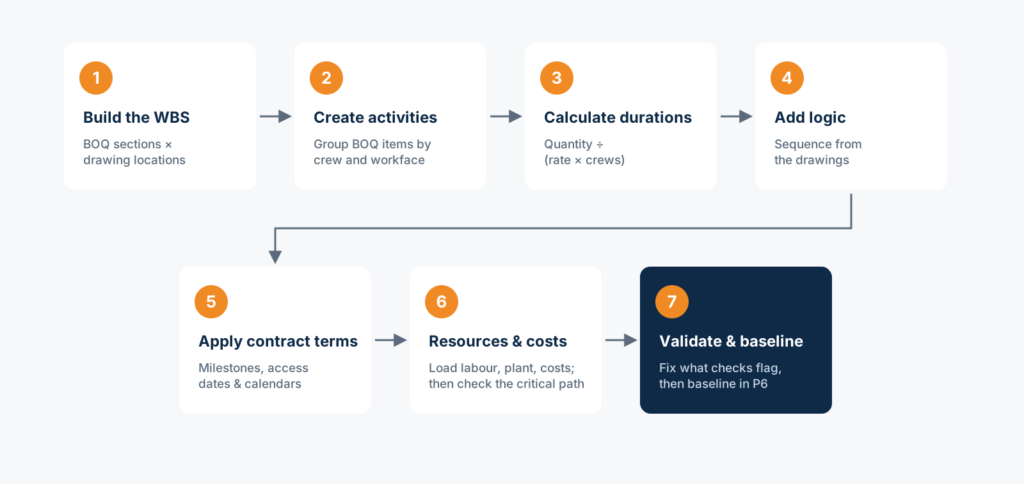
This is the manual method most planners follow, whether the output lands in Primavera P6, MS Project or another CPM tool.
1. Build the WBS from the BOQ Structure
- Start with the BOQ’s sections, such as substructure, frame, envelope, MEP and finishes.
- Cross them with the location breakdown from the drawings: buildings, levels and zones.
- Set this up as your WBS before adding activities.
The result is a work breakdown structure that both commercial and planning teams recognise, making cost and schedule integration easier later.
2. Turn BOQ Items into Activities
A BOQ splits work by specification and usually measures it across the whole building. A schedule needs work grouped by who does it and where, so BOQ lines rarely map one-to-one to activities.
- Combine lines delivered by the same crew in the same workface when the productivity and execution assumptions justify grouping them.
- Split lines covering several locations into separate activities by level or zone, using the drawings to divide the quantity.
- Separate different crews. Formwork, reinforcement and concrete for one slab are three activities, not one.
- Leave out preliminaries, provisional sums and dayworks where they do not represent on-site activities.
For example, on Level 2, Zone A:
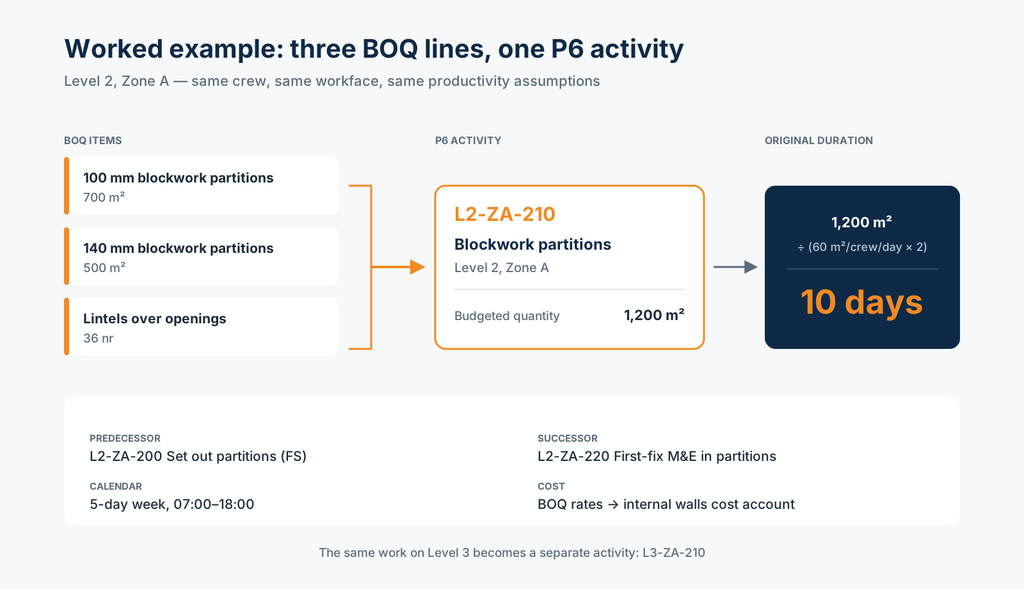
The same work on Level 3 becomes a separate activity, such as L3-ZA-210.
Keep activities short enough to measure progress. Under the DCMA 14-point assessment, activities with baseline durations over 44 working days count toward the High Duration metric. [Link to authoritative DCMA 14-point assessment guidance.]
Name each activity by location and work so anyone reading the schedule can identify exactly what it is and where it occurs.
Grouping a full BOQ by hand is where much of the planning time goes. ConstructMind reads your BOQ and drawings and proposes activity groupings for you to review and adjust. See how the AI construction schedule generator works.
3. Calculate Durations from Quantities
For each activity, divide the measured quantity by a realistic production rate for the crew you plan to use:
Duration (days) = Quantity ÷ (Production rate per crew per day × Number of crews)
- Use production rates from your own historical data where possible, rather than generic tables.
- Record where each rate came from so you can review the assumption later.
- Enter the result as the activity’s Original Duration and store the quantity as budgeted units to maintain traceability.
4. Add Logic from the Drawings
Use the drawings to determine what physically needs to happen before what: foundations before columns, frame before envelope, envelope before internal finishes.
Then:
- Use finish-to-start relationships where appropriate, and start-to-start/finish-to-finish where work genuinely overlaps.
- Minimise leads and lags, and document those that are necessary.
- Check for open-ended activities, and ensure missing predecessors or successors are intentional and defensible.
These relationships drive the critical path.
5. Apply Contract Constraints and Calendars
Bring the contract into the schedule and add:
- Completion and sectional completion milestones
- Access dates and possession windows
- Restricted working hours as calendars
Use hard constraints sparingly. A schedule driven by constraints instead of logic cannot clearly show what happens when something slips.
6. Load Resources and Check the Critical Path
- Assign labour, plant and key materials.
- Cost-load the schedule if you will track cost against it. Load BOQ rates as resource or expense costs mapped to cost accounts.
- Because activities trace back to BOQ items and quantities, planners and cost teams share one view of scope. Progress can later be reconciled against quantities, providing a basis for earned value tracking.
- Check the critical path. If it runs through unexpected work, the logic or duration is usually wrong.
7. Validate Before You Baseline
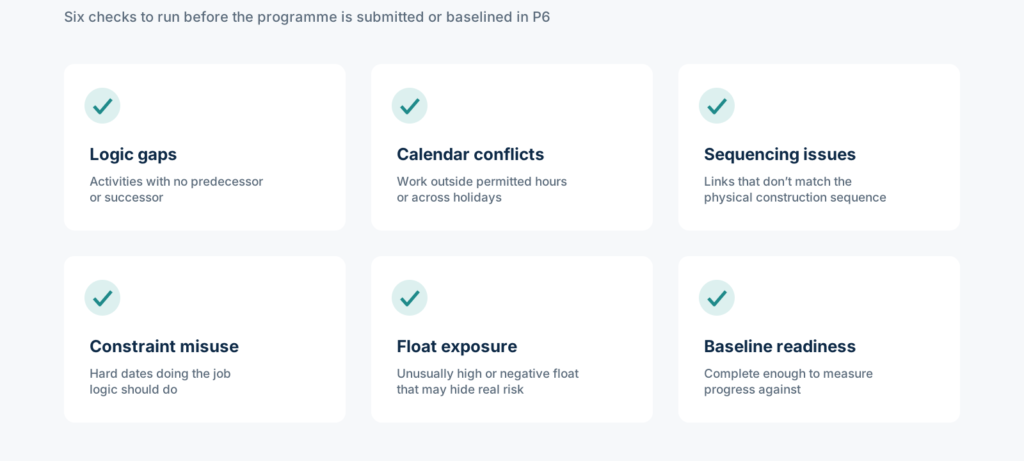
Before the programme is submitted or baselined, check for:
- Logic gaps: activities with no predecessor or successor
- Calendar conflicts: work scheduled outside permitted hours or across holidays
- Sequencing issues: links that do not match the physical construction sequence
- Constraint misuse: hard dates doing the job that logic should do
- Float exposure: unusually high or negative float that may hide real risk
- Baseline readiness: whether the programme is complete enough to measure progress against
Many owners and reviewers also assess schedules using the DCMA 14-point assessment, a widely used set of schedule quality checks.
Fix what the checks flag, re-check the schedule, and once it passes, assign it as the project baseline in P6.
With AI-assisted schedule validation, you can quickly identify logic gaps, constraint issues, sequencing problems and float exposure—making schedule review faster and more consistent.
How to Convert a BOQ into a Primavera P6 Schedule
The BOQ information does not import into P6 on a one-to-one basis. Instead, each piece of information informs a different part of the schedule:
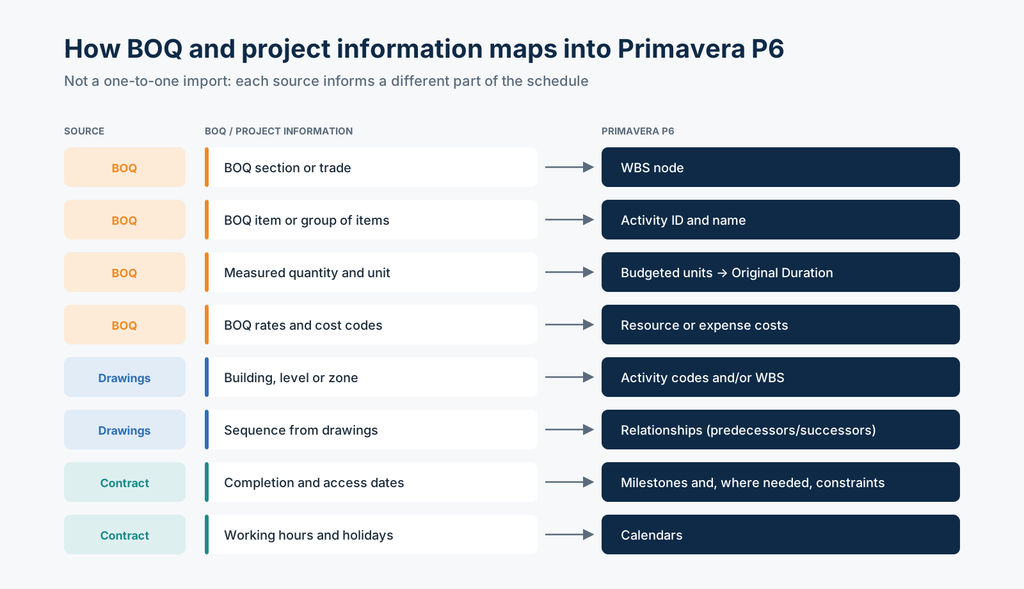
Most P6 activities combine several BOQ items, while some BOQ items, such as preliminaries, never become activities.
Worked Example: BOQ to Primavera P6 Activity
Here is the blockwork activity from the example above as it might appear in P6:
| P6 field | Example |
| WBS | Internal Walls › Level 2 › Zone A |
| Activity | L2-ZA-210 Blockwork partitions, Level 2, Zone A |
| Budgeted quantity | 1,200 m² |
| Production rate | 60 m² per crew per day |
| Crews | 2 |
| Original Duration | 1,200 ÷ (60 × 2) = 10 days |
| Predecessor | L2-ZA-200 Set out partitions (finish-to-start) |
| Successor | L2-ZA-220 First-fix M&E in partitions |
| Calendar | 5-day week, 07:00–18:00 |
| Cost | BOQ rates loaded against the internal walls cost account |
Repeat this process for every activity and you have a cost-loaded Primavera P6 schedule built from the BOQ, with durations and costs traceable back to quantities.
Common Problems When Building a Construction Schedule from a BOQ
The manual method works. The problem is the time it takes and how much depends on individual memory and manual data entry.
Four failure points appear repeatedly:
- Re-keying: quantities are copied from a spreadsheet BOQ into the scheduling tool, creating opportunities for transposed numbers or missed lines.
- Lost traceability: later, nobody can say which BOQ item an activity came from or where a duration assumption originated. This makes the schedule harder to defend in a review or claim.
- Missed contract terms: sectional completion dates, access restrictions, and working-hour limits can be overlooked until after the programme is submitted.
- Late validation: logic gaps and constraint misuse may only be discovered when a client or reviewer checks the schedule after the baseline is set.
None of this reflects a lack of planning skill. It reflects a process that can require planners to spend too much time transcribing information instead of applying professional judgement.
How AI Changes Construction Schedule Generation
The difference between a traditional and AI-assisted process is not what the planner decides. It is how much document processing happens before the planner makes those decisions.
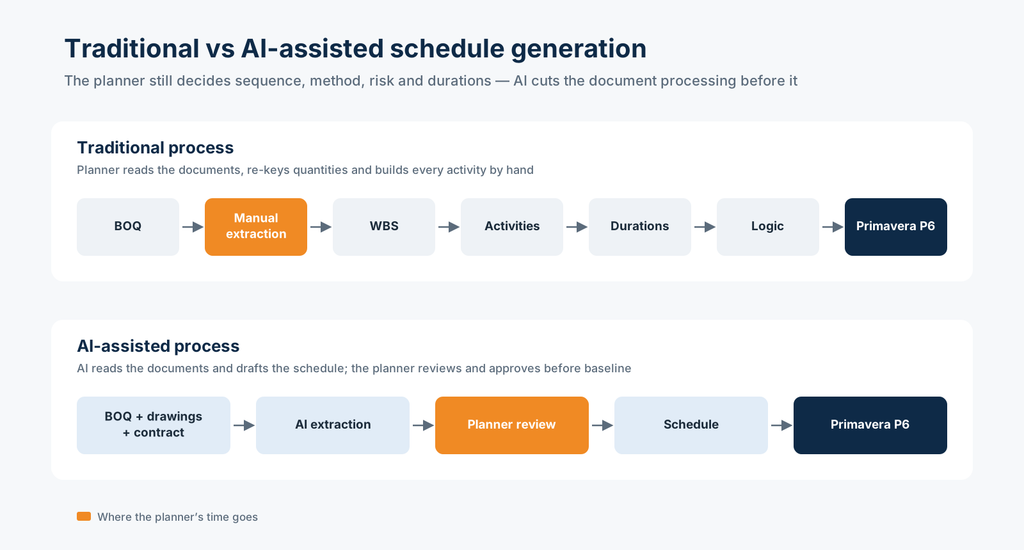
In the traditional process, the planner reads documents, re-keys quantities and builds each activity manually. In the AI-assisted process, AI reads the documents and produces a structured first draft. The planner then reviews, corrects and approves the assumptions before anything is baselined.
AI does not replace schedule engineering. It reduces the document-processing and data-entry work that happens before schedule engineering. Sequence, method, risk, and the final decision on each duration remain with the planner.
How ConstructMind Generates a First-Draft Construction Schedule
That is the approach behind ConstructMind, an AI-powered project controls platform that reads contracts, drawings, and BOQs and generates a first draft of the schedule from them.
- WBS and activities: generated from the BOQ rather than a generic template, so the structure matches the commercial breakdown.
- Durations: calculated from measured quantities, with assumptions visible for planner review and approval.
- Contract terms: converted into milestones, constraints, and calendars, so sectional completion dates and access restrictions aren’t buried in contract documents.
- Validation: logic gaps, calendar conflicts, and float issues are flagged for the planner to resolve before baselining.
- Provenance: activities remain traceable to the document and source line they came from.
- Output: export to Primavera P6 or MS Project, or continue working directly in ConstructMind.
See how the AI construction schedule generator works or learn about scheduling integrations and standalone mode. If you already work in P6, the Planners & Schedulers page shows how this fits into your day-to-day workflow.
Frequently Asked Questions
A BOQ alone is not enough. It provides work items and quantities, but not sequence or dates. You also need drawings for locations and sequence, the contract for milestones, access dates and working hours, and production rates for your crews, ideally from your own historical projects.
Yes. The BOQ provides the scope, quantities and commercial structure that inform the WBS, activities and durations. The planner then develops the activity structure, calculates durations and establishes relationships using the BOQ, drawings, specifications, methodology and other project documents.
Divide the measured quantity by the crew’s daily production rate, multiplied by the number of crews. The production rate is a major input, but the resulting duration must also reflect crew availability, working calendars, workface constraints, sequencing and other project-specific conditions.
A BOQ measures what will be built and is used mainly for pricing and cost control. A Primavera P6 schedule sets out when and in what order it will be built. The BOQ is an input; the schedule is the plan you manage against.
At minimum, a construction schedule should contain a WBS, activities with realistic durations, logic links, contract milestones, working calendars and a clear critical path. Larger projects should also carry resource loading and a baseline to measure progress against.
AI can extract information from BOQs, drawings and contracts and use it to produce a structured first draft of a construction schedule. The planner should still review activity groupings, durations, sequence, methodology and risk before approving and baselining the programme.
Run structured quality checks in the scheduling tool, fix what they flag and re-check before assigning the baseline. Many owners and reviewers use the DCMA 14-point assessment as a benchmark for these checks.
See It on Your Own Project
Bring a real BOQ, a set of drawings and a contract, and we’ll show you the first draft of the schedule ConstructMind builds from them.
