
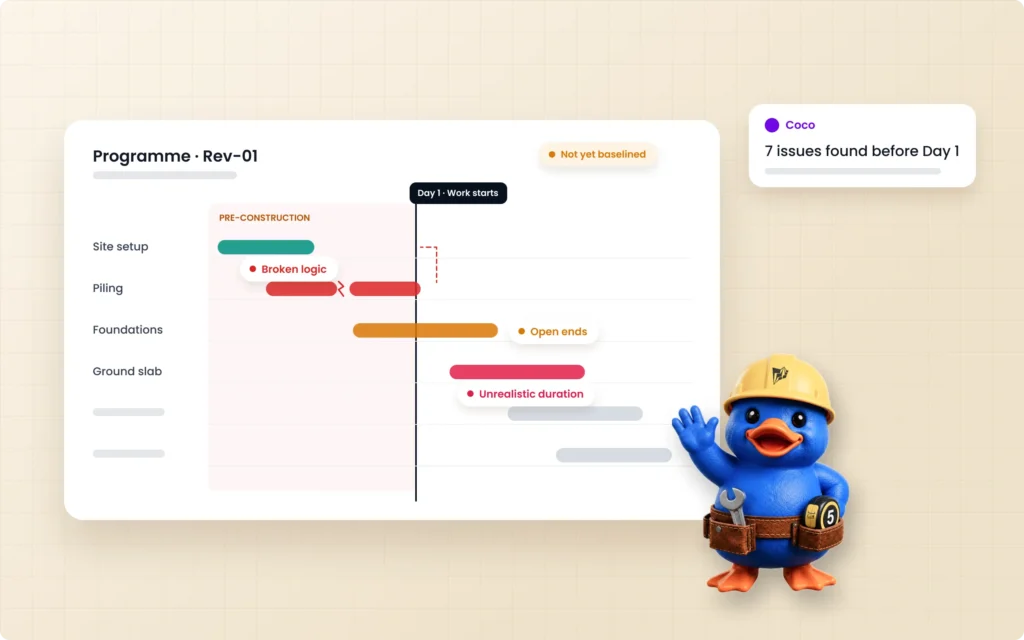
A construction schedule can look complete and still be wrong. Every activity is accounted for, every duration filled in, every dependency drawn. And the plan still fails the moment work starts.
Project teams tend to blame construction delays on weather, supply chains and labor shortages. Those matter. But a meaningful share of delay risk is set months earlier, before the first shovel goes in the ground. It is set in the schedule itself: in sequencing gaps, unrealistic activity durations, and resource loading that does not survive contact with a real crew.
By the time a delay shows up on site, the decision that caused it was usually made weeks earlier, at a desk, by a planner working from an incomplete picture. This guide covers why construction schedules fail before work starts, six common scheduling mistakes behind those failures, and how to catch them before you set the baseline.
What It Means When a Schedule Fails Before Work Starts
A schedule fails before work starts when its logic cannot hold up against the real project, even though nothing on site has gone wrong yet. That is not a scheduling failure in the usual sense. It is a logic failure, built into the CPM schedule when it was created and carried into the baseline unnoticed.
The symptoms show up later: a critical path that moves every update, float that disappears in the first month, crews waiting on work that was never properly sequenced. The cause sits in the first draft.
6 Common Construction Scheduling Mistakes
1. The schedule is built from disconnected inputs
Most schedules are not built from one clean source. Engineering has the drawings, procurement has lead times and vendor commitments, and commercial has the scope, bill of quantities and specifications. Each team works from its own version of the truth until planning forces them into the same room. By then, the gaps between those versions are already baked into the first draft of the program.
2. Missing logic and open ends
An activity with no predecessor or no successor is not connected to the rest of the plan. When it slips, nothing downstream moves, so the schedule never shows the delay it should. Missing logic is one of the first things the DCMA 14-point assessment checks for, because it can quietly break the critical path.
3. Unrealistic activity durations
A duration typed in from experience or copied from the last job is not a forecast. Reliable activity durations come from quantities and production rates that a crew can actually sustain on this site. When they do not, every downstream date inherits the error.
4. Resource loading that does not match the crew
A schedule can be logically sound and still demand more labor or equipment than the project has. If one crew is committed to three workfaces at once, the dates on paper cannot happen on site.
Resource loading needs to be checked against real availability before baseline, not discovered at the first lookahead meeting.
5. Lags and constraints that hide the problem
Long lags often stand in for work that should be its own activity, and hard constraints force dates the logic cannot support. Both can make a schedule look tidy while overriding the CPM calculation underneath it.
The result is a critical path that does not reflect how the work actually drives the finish date.
6. Calendars that do not match the site
Working days, shift patterns, holidays and weather windows all change what a duration means. A schedule built on one default calendar treats a five-day site and a seven-day site the same.
The plan is wrong from day one, even if every activity and link is right.
Why Manual Schedule Reviews Miss These Errors
A planner reviewing a schedule with hundreds of activities by eye will miss things. Not from carelessness, but from scale. Open ends, stacked lags and over-allocated crews do not stand out in a Gantt chart; they hide in the relationships between activities.
Every logic gap or resource conflict that reaches the baseline becomes a delay discovered on site, where it costs far more to fix than it would have at the desk. And because schedule reviews usually happen under deadline, the checks most likely to be skipped are the ones that take longest: tracing logic, testing the critical path, and comparing resource demand with what is actually available.
How to Check a Construction Schedule Before Baseline
A schedule quality check before baseline should work through the schedule section by section, not activity by activity. These six areas catch most of the errors above:
- Scope and structure. Does the WBS cover the full contract scope, and does every BOQ section and drawing package have activities against it?
- Sequencing and logic. Does every activity have a predecessor and a successor where appropriate? Are relationship types and lags justified, and does the critical path run continuously from start to finish?
- Calendars and work model. Do calendars reflect the real working days, shifts, holidays and weather windows for each area of work?
- Resources and productivity. Are durations based on quantities and sustainable production rates? Is any crew or piece of equipment committed beyond what is available?
- Constraints and schedule health. Are hard constraints limited to genuine contract dates? Do float, high-duration and missing-logic counts fall within accepted thresholds such as those used in the DCMA 14-point assessment?
- Overall risk summary. Which findings threaten the critical path or key milestones, and who has decided how each will be resolved?
Checking a Schedule in Primavera P6
In Primavera P6, the same checks map onto tools planners already use. After you schedule the project (F9), the scheduling log lists open-ended activities, out-of-sequence progress and activities with constraints. Trace Logic shows the predecessors and successors driving each activity, so you can follow the critical path through the network. Filters on total float, original duration and relationship lag surface high-float, high-duration and long-lag activities.
The goal is not simply to find errors. It is to decide whether the schedule represents a realistic sequence of work that can be used as a reliable baseline. On a large schedule, tracing logic and resource conflicts this way can still take days.
AI-assisted schedule validation makes this review faster by identifying logic gaps, constraint issues, sequencing problems and float exposure across the whole schedule, leaving the planner to investigate and resolve the findings.
How ConstructMind Catches Schedule Risk Before Work Starts
ConstructMind is an AI-powered project controls platform: it turns your project information into a working schedule and keeps that schedule current, so planners spend their time on decisions instead of rebuilding the plan. It checks for the six mistakes above before the schedule reaches baseline.
One Aligned Set of Inputs
Engineering, procurement, commercial and project teams upload their documents into a single workspace: drawings, bills of quantities and specifications. The schedule is generated from one aligned set of inputs, rather than reconciled after the fact.
A Structured AI Schedule Review
Once a draft exists, it does not go straight to a Gantt chart. It goes through a structured AI schedule review, section by section:
- scope and structure
- sequencing and logic
- calendars and work model
- resources and productivity
- constraints and schedule health
- overall risk summary
ConstructMind flags issues such as missing predecessors, questionable lags and resource conflicts so the planner can investigate the underlying assumption.
Coco, ConstructMind’s in-app AI assistant, shows the working for each duration it calculates, so a planner can see the formula behind the number rather than just the result.
Planners Keep the Judgment
Constructability stays with a human. Whether a sequence makes sense on a real site is not something a system should decide.
When a resource conflict turns up, ConstructMind does not quietly shorten or stretch a duration to make it fit. It flags the conflict, shows the impact, and lets the planner choose how to resolve it.
It generates the schedule; you approve it.
A Defensible Record of How the Schedule Was Built
ConstructMind’s checks are built on inferences drawn from 2,000+ real projects, not a generic rule set. That lets it explain why something looks unusual, based on how similar schedules have played out, rather than simply flagging it.
Every generated schedule also keeps its own record: the scope it is based on, the assumptions behind it, the production rates used, and who approved what. That record helps make a schedule defensible later, whether the question comes from a client, a project manager, or a dispute.
From Documents to a Reviewed CPM Schedule
From the source documents, Coco generates an initial CPM schedule. For a project that would take a planner 4–5 weeks to build manually, the first draft is ready in 25–45 minutes, depending on schedule size. Coco then runs it through validation and refinement, and a full, reviewed schedule is ready in roughly 2–3 hours.
The planner is not reviewing an unexplained output. They are refining a starting point that has already been checked for logic, sequencing, and resourcing.
If you already work in Primavera P6, see how ConstructMind fits alongside your scheduling tools.
Frequently Asked Questions
Why do construction schedules fail?
Many fail before work starts because of errors built into the schedule itself: disconnected inputs, missing logic, unrealistic durations, over-allocated resources, misused lags and constraints, and calendars that do not match the site.
What are the most common construction scheduling mistakes?
Common mistakes include open ends and missing predecessors, durations that are not based on quantities and production rates, hard constraints that override logic, long lags standing in for real work, and resource loading that exceeds what the project has.
How do you check a construction schedule before baseline?
Review it section by section: scope and structure, sequencing and logic, calendars, resources and productivity, constraints and schedule health. Then summarize the risks that threaten the critical path and key milestones.
What should owners check before approving a contractor’s schedule?
If you are reviewing a contractor’s baseline, check scope coverage, logic, durations, calendars, resources, constraints, float and critical path behavior. Then ask for the basis of the schedule: the assumptions and production rates behind the durations. Many owners also use the DCMA 14-point assessment as a benchmark for schedule quality.
What is the DCMA 14-point assessment?
The DCMA 14-point assessment is a set of schedule health checks covering areas such as logic, leads, lags, relationship types, hard constraints, float, high durations, invalid dates, resources and critical path integrity.
Can AI review a construction schedule?
Yes. AI can run structured checks for issues such as missing logic, questionable lags and resource over-allocation across a full CPM schedule much faster than a manual review. Constructability judgment and final approval should remain with the planner.
Are construction delays caused on site or in the schedule?
Both, but a meaningful share of delay risk is set in the schedule before work starts. It only becomes visible on site when the planned sequence, duration or resource assumptions fail against reality.
Catch Schedule Risk at the Desk, Not on Site
Every schedule carries some risk that was set the day it was built, not the day the delay happened. On your next project, ask how much of your delay history actually started on site, and how much started earlier, in logic no one had time to check.
See how ConstructMind reviews a schedule before baseline on a project like yours.
